
A ghost hand and an audience of one
Modern software developers write automated tests for their applications that use the app the way a person does. The tests open a browser, sign in, tap the buttons, fill in the forms, and check that the right things happened. Normally all of this runs invisibly, in what’s called a headless browser, which is exactly what it sounds like: a browser with no window, doing its work where nobody can see. You just get a list of green checkmarks at the end.
Earlier this week I gave the tests for one of my projects a visible mode, mostly out of curiosity, so I could watch them run instead of trusting the checkmarks. It was oddly satisfying. A ghost hand glided through the app, tapping and typing, doing in seconds what would take me a minute. And watching it, I sent a message to the AI coding assistant I work with that said, nearly verbatim, “I watched the tests run and they’re nice! It made me wonder what it would take to generate a training video I could give to Carol.”
The answer turned out to be about an hour.
Built for Carol
Carol is my partner, and Refreshing Spaces is her professional organizing and decluttering business. This week, I built her an app from scratch to run it, covering her clients and visits, invoices and payments, mileage, and the before-and-after photos that really show off all of her work. She works from her phone in clients’ homes, so everything is designed for a phone screen. The app’s entire user base is one person, and she is not a software developer.
That makes for a strangely pure version of a problem every software company faces: how do you teach someone to use a thing? There is no manual for an app that exists nowhere else, and nobody has recorded a YouTube tutorial for software with one user. If the app was going to be learnable, I had to make it teach itself. And in my household, as in most, “watch this forty-second video” beats “read this document I wrote.”
What a generated video looks like
Each video is under a minute. It opens on the app already signed in, with a caption bar across the bottom narrating each step in a sentence. A small blue ring plays the part of a finger, gliding to a button and pulsing when it taps, moving at a pace you can follow. Text gets typed one character at a time, the way a person types. Everything on screen is the real application, doing real work.
Now, viewers of my YouTube cooking series will know I’m no stranger to the world of video editing, but still I found this part genuinely pleasing: no camera was involved, and no video editor either. The videos are recorded by the same kind of automation that runs the tests. A short script says, in effect, “show this caption, tap this button, type this name, wait for the save,” and the browser does it while recording itself. The video file that comes out is less like a film and more like a compiled program. The script is the source; the video is just what it produces today.
That one property makes maintaining these a dream, and I’ll come back to it at the end.
The videos are silent on purpose, though that wasn’t the original plan. The plan was voiceover, and each recording still produces a little narration script with timestamps for a voice to read. Some day I might play around with automated voice generation (synthesized speech continues to improve by leaps and bounds) but while creating these I realized the silent, captioned versions were the better product anyway. Carol can watch one in a client’s living room without headphones, in a spare minute, with nothing to unmute.
All fifteen are public, so Carol can brag about her bespoke software to her friends: refreshingspaces.life/help/videos. They’re grouped by the shape of her workday, with sections like “Start here,” “Getting paid,” and “Out and about,” because when there’s one user, the natural organization is her day, and I know exactly what her day looks like.
Feeling human
Getting the recordings to feel like a person showing you something, rather than a machine executing steps, took several rounds of watching them and wincing.
The first version jumped from place to place, the way automation naturally moves, because a computer has no reason to scroll gradually when it can arrive instantly. A human would scroll and swipe with smooth motions, so every movement became a smooth, eased glide. Jump-cuts read as a machine. Eased motion reads as someone showing you.
The second problem only revealed itself on watching: the caption bar sits at the bottom of the phone screen, which is exactly where apps put their most important buttons, so several taps happened underneath the caption. Now, when a tap is headed for the bottom of the screen, the caption politely hops to the top for that moment. It’s a small behavior, and it’s the difference between a video you trust and one that visibly hides the thing it’s teaching.
The third appeared on camera inside an error message. A form arrived with an amount already filled in, the automation typed a new amount on top of it, and the video proudly displayed “36.5012.00.” The typing now clears a field before it fills it, the way you would.
All three of these were caught by a human (me!) watching the finished video, not by any automated check, and that’s worth repeating for anyone leaning on automation for anything: reviewing your own generated material is the quality control, and it doesn’t automate away.
One more choice from this stage, which I think about more than I expected to. I sprinkled Carol’s business tagline throughout her app, but I chose to leave it out of the training captions. It belongs to her voice, and somehow it felt wrong seeing her voice in the caption bar narrating to herself where to tap. Somebody has to decide where a brand’s voice does and doesn’t go, and it turns out that’s true even when the brand is your partner’s and the audience is her.
Porting it to LocallyGrown
The prototype was built in an evening for one person. The next night I brought the system to LocallyGrown.net, the farmers market platform I’ve built and run since 2002, and everything became plural. Shoppers, growers, and market managers each needed their own walkthroughs. People often shop on phones while managers often run markets on laptops (but not always!), so most walkthroughs got recorded twice, at phone size and at computer size. Twenty-five walkthroughs now produce forty-nine videos at locallygrown.net/docs/videos, and short “watch” links sit inside the written documentation, right next to the paragraphs they illustrate.
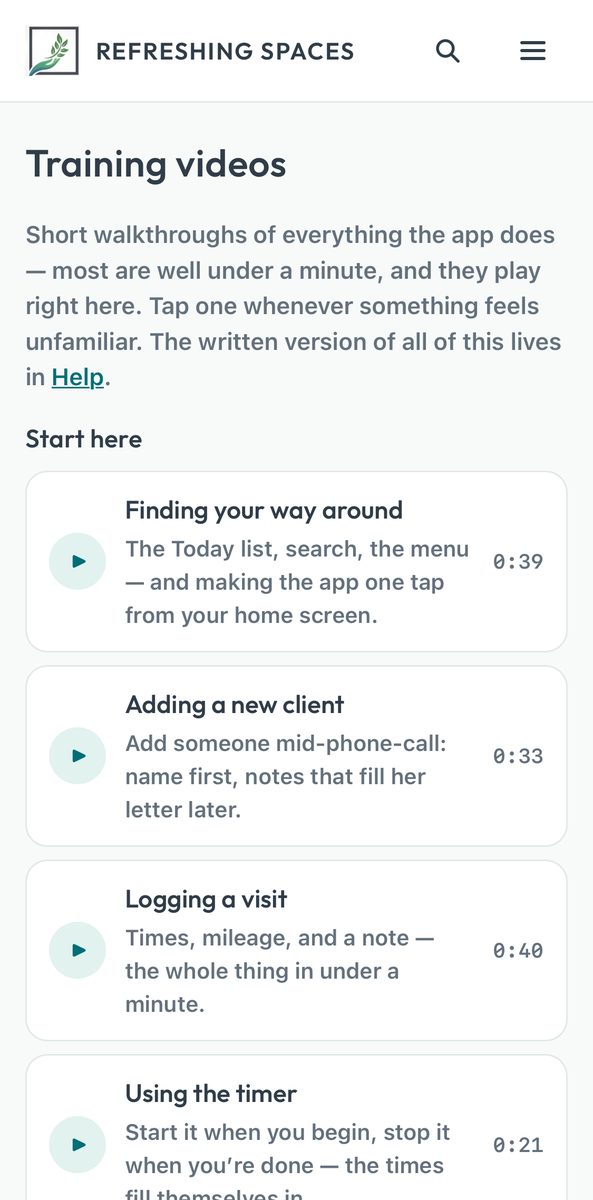
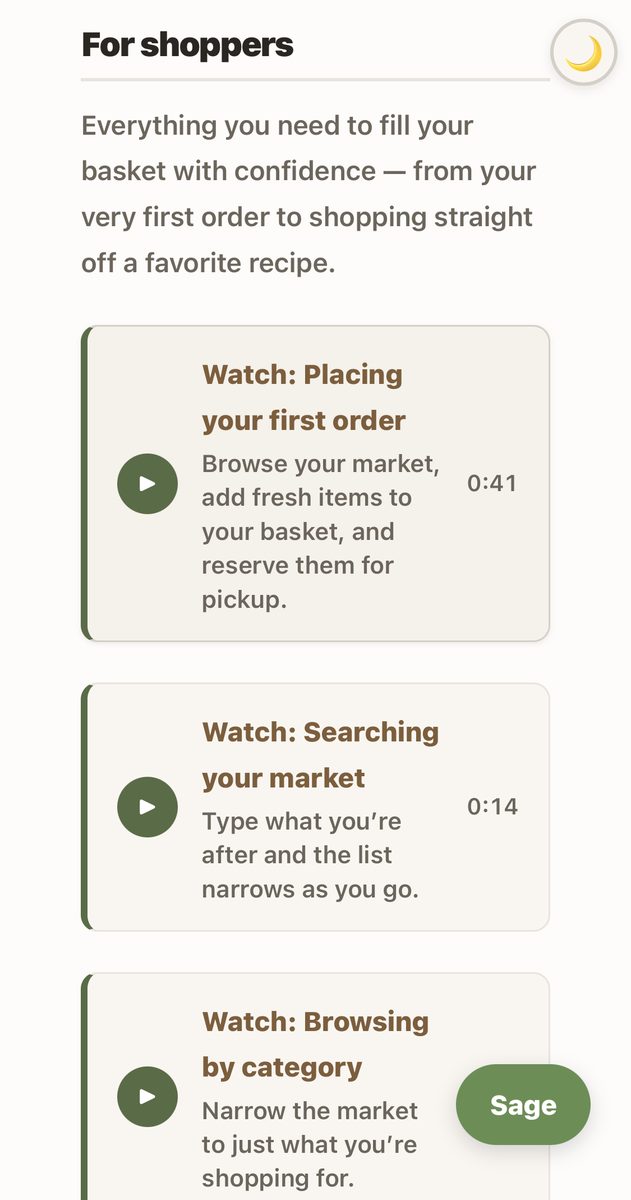
The two video libraries came out differently in a way I didn’t plan, and the difference says something about audiences. LocallyGrown’s is grouped by role, because strangers arriving at a documentation page need to find their section. Carol’s is grouped by her workday, because there are no roles when there’s one user. You can see it in the writing, too. LocallyGrown’s descriptions say things like “read the story behind the farm before you buy,” addressed to a stranger, while Carol’s say “a receipt when she pays,” because I know exactly who “she” is.
Scaling up also meant the demo data had to grow up. The recordings run against a make-believe farmers market, seeded into the system the way test data always is, which just means the database gets filled with plausible fictional things before the cameras roll: a market called Sweetwater, farms with products, shoppers with baskets. One video introduces shoppers to their growers, and it’s only as good as the fictional grower it features. The seeded farm turned out to have contradictory placeholder junk, including a “uses synthetic chemicals” badge on a market that bans them, a one-line bio, and an empty photo frame. So I wrote the farm properly: a real three-paragraph story, a coherent certification, a photo. Quality time writing fiction changed how real every frame of that video feels. Good demo data is a form of writing. And once I started I kept going, because this turned out to be my favorite part of the whole project. The fixtures grew into a small fictional world: growers with histories, neighbors who buy their food from each other, a recipe that travels from one kitchen to another, dinner made for family and friends. I spent nineteen years running a real market like that, so writing the fictional one drew on a deep well. Sweetwater became an aspirational story about what a market can be, and every video is a little window into it.
And one walkthrough turned out to be impossible to record. The video for adding a photo to a product showed nothing happening at the moment the photo should appear, because nothing did happen. The automation and the app’s user interface framework disagree, in a subtle and interesting way, about what counts as “the user picked a file,” so the automated recording genuinely cannot do what a real person’s finger does. Real growers are unaffected. Rather than fake it, I dropped the video and kept the written guide. The companion post will be full of technical dives into issues like this, if that’s your bag.
A cautionary tale about junk drawers
The whole pitch of this system is that it records the real application with realistic data, and that pitch has a failure mode worth knowing about before you point a camera at a development database.
While getting Carol’s videos ready for public sharing, I noticed that one table in the development copy of her database still held real information. A few days earlier, I had imported her actual mileage spreadsheet to test that feature, and the import was still sitting there. Nothing in it was sensitive, and none of it ever reached the public site, but it was real data in a database I treat as entirely fictional, and I only noticed because I happened to look.
A development database is a junk drawer. Things get put into it for good reasons and never taken out, and after enough time nobody remembers what’s in the back. So a rule came out of the moment, and it’s now built into the recording process: before recording anything meant for sharing, verify that every screen the camera visits shows only fictional data. The rule is deliberately not “check the data you remember putting in,” because the whole problem is the data you forgot.
The fiction has to be constructed with some care in the other direction, too. Some features don’t appear at all until they’re configured, so the demo data has to be rich enough to unlock everything the videos teach. The one-tap mileage button needs a home-base address before it will show itself, so the demo data includes one. For the address I picked a brewery a few streets over that we like to hang out at, which satisfies both halves of the rule: rich enough to unlock the feature, and verifiably fake.
Living with it
Here’s why “the video is a compiled program” matters. Every product help video ever filmed starts rotting the day it’s published. The interface changes, the video is now wrong, and re-filming is so tedious that mostly nobody does, which is why the internet is full of tutorials for versions of software that no longer exist.
My videos still rot. Literally within two hours of shipping, I had redesigned one page, added a label to another, and added a whole new tab to the navigation, and three videos went stale almost immediately. What changed is what happens next. Each fix was one command and a couple of minutes, and the freshly rebuilt videos simply replaced the old ones. There was one wrinkle where the internet itself kept showing everyone the old copies for a while (networks keep cached copies of files to serve them faster, and mine didn’t know the videos had changed) but that too had a small, boring fix, covered in the companion post.
The discipline that emerged is a single question, asked after every change I ship: which videos show the screens I just touched? I rebuild those and move on. Nothing reminds me to ask it yet, and the system only stays cheap as long as someone does, so the question is headed for a checklist. In the meantime, every rebuild means I get to watch the ghost hand glide through the apps again, and that hasn’t gotten old yet.